
Listonic vs Bring!: Best Grocery List App for Budgeting, AI Planning, and Everyday Shopping in 2026?
Which is the best grocery list app for budgeting, AI planning, and everyday shopping in 2026?

This comparison is based on Bring!’s official site and blog, its App Store and Google Play listings, and its Google Play Data Safety disclosure, checked August 20, 2026. Store ratings, pricing, and feature availability can vary by country or storefront view. Where Bring!’s own material did not clearly document a detail, such as exactly what its paid Premium tier unlocks, this article says so rather than guessing.
TL;DR
My recommendation
I recommend Listonic over Bring! for most people because it covers everyday shopping and meal planning with AI and real budgeting for free, while Bring! stays a well-liked but narrower icon-catalog list with ads and no price tracking at all.
Choose Listonic
If you want AI-assisted meal planning, saved item prices and a running total, and a broad free tier without ads holding any of it back.
Choose Bring!
If you prefer tapping icons over typing items, want a curated recipe feed with one-click import from recipe sites, and use Siri, Alexa, or an Apple Watch daily.
I recommend Listonic for most people comparing the two. Real-time sharing needs no account on the other end, and the AI assistant handles meal planning, saved item prices, and a running total on top, all free with no ads interrupting any of it [1, 2].
Bring! is a genuinely well-built app in its own lane: an icon-based catalog that turns list-building into mostly tapping, a curated recipe feed, and confirmed Siri, Alexa, and Apple Watch support that Listonic does not match. Where it falls short is budgeting: it has no way to track item prices or a running total at all, and its free tier carries ads.
What to look for in a grocery list app in 2026
The best grocery list app in 2026 should get you through a shop quickly, help you plan meals, and tell you what it’s actually going to cost [1, 2].
Speed and ease of use
How fast can you add an item and check it off, without fighting the app itself?
Real-time sharing
Does everyone in the household see changes instantly, with minimal setup?
Recipes and meal planning
How well does the app turn a meal idea, or a recipe you already found, into a shopping list?
Everyday shopping and budgeting
Does the app help you track what the trip actually costs, not just what to buy?
Platform reach and voice integration
Does the app reach beyond the phone itself, into a smart speaker or a watch?
Free version value
What is actually free, and what is the real cost of "free" — ads, limits, or a paywall?
Ratings and reviews
Do real users, at scale, back up the pitch?
Listonic and Bring! are built around different habits
Listonic is built around planning and budgeting a shop; Bring! is built around browsing an icon catalog and tapping what you need [1, 2].
I see Listonic as more of an AI-assisted planning and budgeting app: ask for a meal plan or a list, get saved prices and a running total along the way, and share it with no account required on the other end.
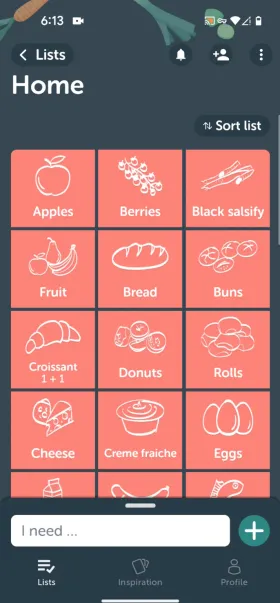
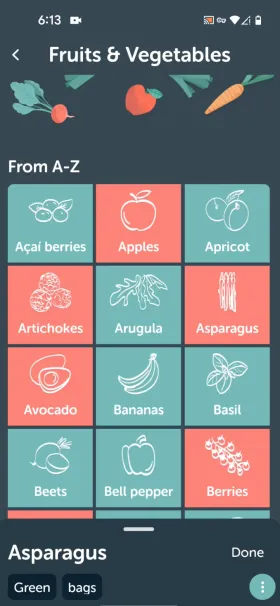
I see Bring! as more of a visual, tap-first shopping list: a large icon catalog for items you buy often, a curated recipe feed for inspiration, and a paired watch or smart speaker for hands-free additions. Both are legitimate approaches; they just optimize for different moments.

Listonic
A fast, AI-assisted shopping list app built around planning and budgeting, all free
Strongest documented strengths: AI meal planning, saved item prices, total cost tracking, broad free tier, 40+ languages

Bring!
An icon-catalog shopping list app with a curated recipe feed and strong voice/wearable support
Strongest documented strengths: Icon-based catalog, recipe import from websites, Siri, Alexa, Apple Watch app

Listonic wins on budgeting, planning, and free-tier value; Bring! wins on voice and wearables
My short answer is that Listonic is the stronger overall pick, because budgeting and AI-assisted planning matter to more shoppers, more often, than a smart-speaker integration [1, 5].
The one category where I score Bring! ahead is platform reach and voice integration, and I want to be upfront about that rather than smooth it into a clean sweep. Its Siri, Alexa, and Apple Watch support are real and confirmed, and Listonic has no equivalent. Everywhere else, Listonic’s budgeting tools, AI planning, and ad-free broader free tier add up to the stronger everyday app.
| Question | Better app | Why |
|---|---|---|
| Best overall grocery list app | Listonic | AI planning and real budgeting are free, and nothing important is held back for ads or a paywall |
| Best for everyday grocery shopping | Listonic | Saved item prices and a running total help at the point of actually shopping; Bring! has no equivalent |
| Best for staying on budget | Listonic | Bring! does not track item prices or a running total at all |
| Best for meal planning and recipes | Listonic | An AI assistant that builds a plan and a list in one step goes further than a curated feed plus manual import |
| Best voice-assistant and wearable coverage | Bring! | Confirmed Siri, Alexa, and a native Apple Watch app, none of which Listonic documents |
| Best free-tier value | Listonic | A broader feature set is free and ad-free, where Bring!’s free tier carries ads and gates an unclear set of features behind Premium |
| Best backed by ratings at scale | Listonic | A half-star lead on Google Play, the platform with by far the larger review sample for both apps |
What Listonic’s published data adds to the case
I do not want to rest this on opinion alone, and Listonic does have first-party signals that support the recommendation [1, 4].
- Budgeting
-
Users who track prices can spend up to 25% less on a weekly basis
Bring! has no price-tracking feature to offer an equivalent outcome
- Shared shopping
-
Users who share lists report fewer forgotten items and fewer duplicate purchases
Directly matches one of the most common household grocery problems
- Faster shopping
-
Shoppers with grocery lists spend an average of 23 minutes less time in stores
Explains why better list structure has a real-world payoff
- Repetition
-
About 70% of grocery-list items are repetitive
Justifies why history-based speed features and smart suggestions matter so much
- Reach
-
10M+ Android downloads and 316K Android reviews for Listonic, against Bring!’s 10M+ downloads and 144K reviews
Comparable scale on Android, with Listonic holding a meaningfully higher rating on the larger of the two review samples
- Review sentiment
-
Since 2023, Listonic’s own written reviews average 4.48 against Bring!’s 3.94, with 87.4% positive against 70.5%
A wide, consistent gap across roughly 49,000 combined reviews, not just a handful of samples
How I evaluated these apps
I used a weighted editorial scoring model because this comparison is not a clean sweep in either direction, and the model keeps me honest about that [1, 2].
| Category | Weight | Listonic | Bring! |
|---|---|---|---|
| Speed & ease of use Grocery lists are repetitive. The faster the app gets you from idea to list, the more consistently you use it. | 15% | 9.0 | 7.6 |
| Real-time sharing A shared list only works if everyone sees the same thing without friction. | 12% | 8.8 | 7.9 |
| Recipes & meal planning Turning a meal idea into a shopping list, quickly and with minimal extra work, is real everyday value. | 15% | 8.6 | 7.4 |
| Everyday shopping & budgeting Tracking what the trip actually costs is one of the most requested things a list app can do. | 15% | 9.2 | 6.0 |
| Platform reach & voice integration Voice assistants and a watch app extend a list beyond the phone itself for the households that use them. | 10% | 8.5 | 8.6 |
| Free version value Most shoppers will never pay for a grocery list app, so the free tier has to be genuinely usable. | 18% | 9.4 | 6.8 |
| Ratings & reviews Ratings at scale are the closest thing to a real-world track record. | 15% | 9.0 | 6.8 |
| Weighted total | 100% | 9.0 | 7.2 |
| Categories won | 7 | 6 | 1 |
Keep in mind
These are my own editorial scores, based on verified feature sets, official pricing and Data Safety pages, and live storefront data. They are not lab benchmarks. Platform reach and voice integration is the one category where Bring! is genuinely ahead, and the score reflects that rather than smoothing it over.
Why you can trust this comparison
I built this article on Bring!’s own official pages and live storefront data, not a skim of a single app-store description.
I went through Bring!’s official site and blog, its current App Store and Google Play listings, and its Google Play Data Safety disclosure. Where the official material left something unclear, such as exactly what Bring! Premium unlocks, I say so rather than presenting a guess as fact [1, 3, 4, 5, 6].
I also went through both apps’ written reviews since 2023, rather than sampling a handful. Listonic collected roughly 4 times more of them than Bring! over that period (39,242 against 9,852), and it was the more positively reviewed of the two: 87.4% positive against Bring!’s 70.5%, for a net-positive score of 78.3% against 52.4%. Where a figure in this article comes from that review analysis rather than a live storefront check, I say so.
What was counted
- Reviews read
- Listonic, across 73 languages
- 39,242
- Bring!, across 49 languages
- 9,852
- Reply rate on 1–2★ reviews · Listonic
- %
- Reply rate on 1–2★ reviews · Bring!
- %
Window: Since January 2023
| Source type | What it was used for |
|---|---|
| Official site and blog | Core feature claims, platform support, and what is described as free versus paid |
| App Store and Google Play listings | Ratings, review counts, downloads, in-app purchase pricing, and confirmed platform integrations |
| Google Play Data Safety disclosure | What each app shares with third parties |
| Public app-store reviews (source comparison deck) | Review-volume, sentiment, and language-reach comparisons since 2023 |
At a glance
These profiles summarize the strengths, limitations, storefront signals, and positioning of both apps [1, 3, 4, 5].
Listonic
20M+ downloads · 350K+ reviews
Best for
- Shoppers who want AI-assisted meal planning and per-item budget tracking, all free
- Families and couples who want a fast, no-frills shared list with nothing paywalled
Key pros
-
An AI assistant that plans meals and turns them into a list, from text, voice, or a photo
-
Total cost calculation and saved item prices, not just a running total
-
A broader always-free feature set
-
Real-time shared lists that need no account on the other end
Key cons
-
No documented Siri Shortcuts or Alexa skill, unlike Bring!’s
Bring!
Best for
- Shoppers who like an icon-based, tap-to-add catalog over typing item names
- Households that want a curated recipe feed and one-click import from recipe websites
Key pros
-
A large icon catalog that turns list-building into mostly tapping instead of typing
-
A curated recipe-inspiration feed plus one-click ingredient import from external recipe sites
-
Confirmed Siri, Alexa, and Apple Watch support
Key cons
-
Runs ads on the free tier, and what its paid Premium actually unlocks is not clearly documented
-
No per-item price tracking or budgeting tool of any kind
-
A meaningfully lower Google Play rating than Listonic, on a larger review sample
What people say about both apps
Both apps have specific, attributable praise behind them, not generic five-star noise [3, 5].
I love the real-time sharing feature and also the automated classification of items into categories.
Bring! simplifies shopping for millions of households worldwide.
The numbers behind those impressions
“Simplicity and ease” is the single most common theme in each app’s positive English-language reviews, and Listonic edges out Bring! on it. Bring!’s own positive reviews mention recipes and planning far more often than Listonic’s do, which tracks with how much more of Bring!’s app is built around its recipe feed.
| Theme | Listonic | Bring! |
|---|---|---|
| Simplicity and ease | 35.0% | 29.4% |
| Recipes and planning | 0.8% | 7.1% |
Why the choice depends on how you shop
The clearest reasons to pick Bring! are its icon catalog and voice/wearable support; the clearest reasons to pick Listonic are budgeting and free-tier breadth.
Bring!’s case is reach beyond the phone
It documents Siri and Alexa integration for hands-free additions, and ships a native Apple Watch app, none of which Listonic currently confirms [2].
Listonic’s case is the point of actually shopping
Saved item prices and a running total cost nothing, where Bring! has no budgeting feature at any price [1].
Bring!’s catalog is more customizable than it looks
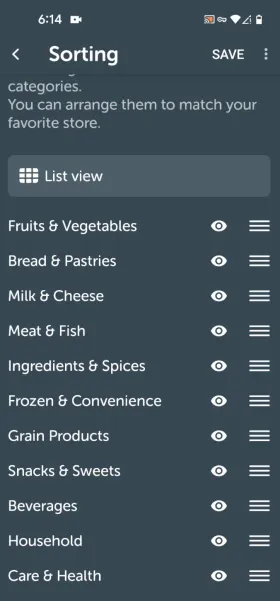
A dedicated Sorting screen lets you drag entire categories into a different order, so the list can match how your own regular store is laid out.
One detail worth knowing if you plan to use Bring! in English
It supports 13 languages and works well for most of its interface, but at least one third-party integration has been reported to surface item names in German regardless of the app’s set language, a legacy of its Swiss and German-speaking roots [5, 7]. That reach gap shows up in the review data too: since 2023, Listonic’s reviews span 73 languages and 97 countries, against Bring!’s 49 languages and 86 countries.
Speed & ease of use comparison
Listonic is faster for planning-heavy shopping because the AI assistant collapses several steps into one; Bring!’s icon catalog is faster for a quick, repeat-heavy list [1, 2].
| Task | Listonic | Bring! | Winner |
|---|---|---|---|
| Build a fast list without typing much | Type, speak, or snap a photo and the AI sorts it for you | Tap icons from a large visual catalog or a list | Listonic |
| Turn a recipe into a shopping list | Ask the AI assistant, which builds the list in the same step | Import ingredients from a recipe website or the curated feed with one tap | Listonic |
| Track what the trip will cost | Item prices and a running total, free | No price-tracking feature at all | Listonic |
| Add items hands-free | In-app voice dictation, no OS-level assistant confirmed | Confirmed Siri and Alexa integration | Bring! |
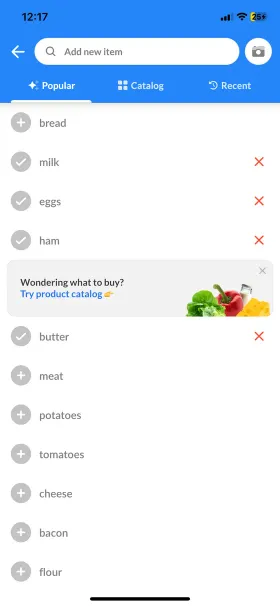
Bring! is not slow. Its icon catalog is genuinely quick for the items you buy every week, and its search autocompletes well. The gap opens up on anything that requires math: neither the app nor its catalog tracks what an item costs, so budgeting has to happen outside the app entirely.
Pricing and free-version value
This is one of the widest gaps in the comparison, and it runs in Listonic’s favor [5].
Free on Listonic: the AI assistant, item photos, total-cost calculation, saved prices, custom categories and sorting, and the full web app, with no ads. Bring!’s free tier is broad too, including its icon catalog, sharing, item photos, and recipe feed, but it runs ads throughout, and its paid Premium tier’s exact feature list is not clearly documented in public material.
| Pricing angle | Listonic | Bring! | My take |
|---|---|---|---|
| What you get without paying | AI assistant, item photos, total cost calculation, saved prices, custom categories and sorting, and the full web app | Lists, sharing, the icon catalog, item photos, and the recipe feed, with ads | Listonic’s free tier goes further and carries no ads; Bring!’s free tier is broad but ad-supported |
| What the paid tier unlocks | Mostly ad removal and deeper personalization | Bring! Premium at $1.99/month or $8.99/year, though official material does not clearly document what it adds over the free tier | Listonic is explicit about what its paywall covers; Bring!’s Premium value proposition is comparatively unclear from public documentation |
| Budgeting for the price | Saved item prices and a running total, included free | No equivalent at any price | This is the widest gap in the whole comparison |
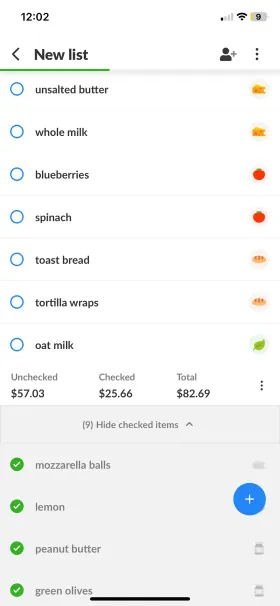
Real-life shopping list workflows
When I map these apps onto real workflows, Listonic wins the planning- and budget-focused ones, and Bring! wins the voice-and-wearable one.
Turning a recipe into a shopping list Listonic
Bring! makes this a one-tap action if the recipe is already on a supported website, or comes from its own curated feed [2]. Listonic’s AI assistant covers the same job from a plain-language request instead, without needing a source recipe at all.
Staying on budget during the trip Listonic
Listonic is the only one of the two with an answer here: item prices and a running total are free and visible the whole time you shop [1].
Adding items hands-free Bring!
Bring! is the stronger choice if you already use Siri or Alexa daily, since both are documented integrations [2]. Listonic’s voice input works from inside the app, which covers the same basic need without the smart-speaker integration.


Feature comparison table
Listonic covers more of the everyday planning and budgeting workflow for free; Bring! covers more of the voice-assistant and wearable workflow [1, 2, 3, 4, 5].
| Feature | Listonic | Bring! |
|---|---|---|
| AI-assisted meal planning | Yes | No |
| Total cost calculation | Yes | No |
| Item price memory / budget tracking | Yes | No |
| Item photos | Yes | Yes |
| Real-time shared lists | Yes | Yes |
| Custom categories | Yes | Yes icon-based catalog |
| Custom sort order | Yes | Yes drag to reorder categories |
| Product / autocomplete suggestions | Yes | Yes |
| Recipe import from websites | No | Yes |
| Voice input for adding items | Yes | Yes |
| Android home-screen widget | Yes | Yes |
| Web app | Yes | Yes |
| Languages | Yes 40+ | Partial 13 |
| Paid plan available | Yes | Yes $1.99/mo or $8.99/yr |
| Siri and Alexa integration | No | Yes |
FAQ
Which app is better for everyday grocery shopping?
Listonic. Saved item prices and a running total help at the point of actually shopping, real-time sharing needs no account on the recipient’s side, and none of it is held back for a paywall or interrupted by ads.
Which app is better for recipes and meal planning?
Listonic’s AI assistant can turn a request straight into a meal plan and a shopping list in the same step. Bring! is not far behind for anyone who prefers browsing: it has a curated recipe-inspiration feed and can import ingredients from external recipe websites with one tap, which Listonic does not offer.
Does either app support Siri or Alexa?
Bring! documents both, along with a native Apple Watch app. We could not find equivalent official confirmation for Listonic; its voice input is in-app dictation rather than an OS-level assistant integration.
Which app has the better app-store rating?
On Google Play, the platform with by far the larger review sample for both apps, Listonic leads at 4.7 against Bring!’s 4.1, with a comparable review count (316K against 144K). On the App Store the two are essentially tied, at 4.7 for Listonic and 4.8 for Bring!, on a similarly sized sample for both.
The bottom line
Final verdict
Bring! is a genuinely well-liked icon-catalog list with strong voice-assistant and Apple Watch support; Listonic is the more complete, free, and better-rated app for everyday shopping and budgeting.
Bring! is a well-liked, well-built app for anyone who prefers an icon catalog to typing and already lives inside Siri, Alexa, or an Apple Watch. For everyday shopping and staying on budget, which is what most people need most of the time, Listonic is the more complete app: AI-assisted planning, saved item prices, and a broad, ad-free free tier that Bring! does not match [1, 2].
