
Listonic vs Samsung Food: which app works better for the shopping itself?
A grocery list app against a recipe app that generates grocery lists. I compare the two where they differ most.

This comparison is based on both makers’ own descriptions of their apps, their Google Play and App Store listings, and a full export of both apps’ reviews since January 2023. Checked September 1, 2026. Store ratings, pricing and feature availability can vary by country and storefront view.
TL;DR
My recommendation
If you are after a grocery list app, I would pick Listonic: in Samsung Food, list items cannot be edited or manually reordered, and there are no prices, no list total, no custom categories and no shopping history. I would pick Samsung Food when you genuinely start from a recipe, because at recipes and meal planning it is the better app [1, 2].
Choose Listonic
If the list is the starting point: you want it ordered for your store, prices attached, the total visible before the till, and the things you buy every week one tap away.
Choose Samsung Food
If the recipe is the starting point: you save recipes from around the web, plan meals for the week, and want the shopping list to fall out of that plan on its own.
This is not a comparison of two grocery list apps. It is a comparison of a grocery list app with a cooking app that can generate a grocery list, and the whole difference follows from that [1, 2].
Samsung Food turns recipe ingredients into a shareable list very well. It handles a list that did not come from a recipe far less well, and most weekly shopping is that kind of list. That split shows up in a full export of both apps’ reviews since January 2023: Listonic’s average review is higher on both platforms — 4.50 against 4.06 on Android, 4.40 against 4.05 on iOS — while the word “recipes” appears in 43.8% of Samsung Food’s positive Android reviews and just 0.2% of Listonic’s.
What to keep in mind when picking a grocery list app
Grocery list apps can simplify a shopping routine a great deal, but not all of them are the same. Here are five things I think are worth checking before you choose [1, 2].
Ease of use
Does adding and checking off an item take one tap, including when you are in a hurry?
Sharing and collaboration
Can the list be shared, and does the other person see changes at once without it being sent again?
Personalization
Does the app adapt to how you shop, or do you have to adapt to it?
Extra features
Recipes, meal plans, prices, photos: what else do you get alongside the list itself?
Free versus paid
Where does the paywall fall, and are the basics on the right side of it?
Two different starting points
When it comes to organizing grocery shopping, the right app makes a real difference. Listonic and Samsung Food come at it from opposite directions [1, 2].
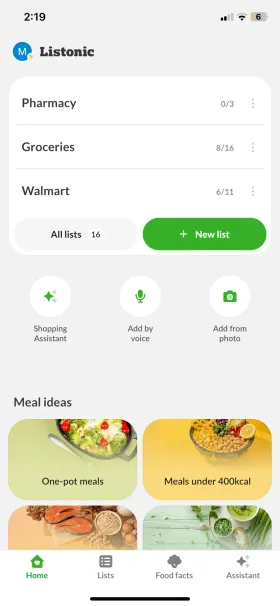
Listonic starts from the list. Everything in it, sorting, prices, notes, shopping history, exists to get the list built faster and to make it usable in the store.
Samsung Food starts from the recipe. You save recipes from any website, build a meal plan out of them, and the shopping list falls out of that plan as a by-product, a very good one, as long as you started from a recipe.

Listonic
A grocery list app: fast entry, sorting for the store, and the cost of the trip as you go
Strongest documented strengths: Automatic and custom sorting, custom categories, item prices and a list total, shopping history, notes and photos on items, real-time sharing

Samsung Food
A recipe and meal-planning app that can turn ingredients into a shopping list
Strongest documented strengths: Saving recipes from any website, meal plans matched to a diet, nutritional information, Vision AI for identifying ingredients from a photo, integration with Samsung appliances
Who wins which question
My short answer is that Listonic is the better app for managing a shopping list, and not because it has more features. It is because in Samsung Food a list item cannot be edited or manually reordered at all [1, 2].
The direction is not one-way, though. When you start from a recipe rather than from a list, Samsung Food does something Listonic does not attempt.
Net positive, the share of 4–5★ reviews minus the share of 1–2★ ones, puts a number on the shopping-list gap: 79.5% for Listonic against 57.1% for Samsung Food on Android, and 73.8% against 54.8% on iOS.
| Question | Better app | Why |
|---|---|---|
| Best app for the shopping list itself | Listonic | Samsung Food items cannot be edited or reordered by hand, and the list carries no prices and no total |
| Best in the store, by aisle | Listonic | Custom categories, a custom category order and manual sorting: Samsung Food has none of the three |
| Best for staying on budget | Listonic | Item prices and a running list total; Samsung Food has no equivalent |
| Best for recipes and meal planning | Samsung Food | Recipes saved from any website, plans matched to a diet, and nutrition data: Listonic’s assistant plans, but keeps no recipe library |
| Best free tier | Listonic | Samsung Food keeps pantry management, nutrition tracking, full-week plans and AI recipes behind a subscription |
| Best for someone who just wants it to work | Listonic | Samsung Food reviews keep returning to recipe-editing and syncing bugs that survive update after update |
How I scored the two apps
The scores are weighted because these two apps aim at different moments of the same week. The category Samsung Food wins carries one of the two highest weights in this table [1, 2].
| Category | Weight | Listonic | Samsung Food |
|---|---|---|---|
| Speed & ease of shopping Both apps have product suggestions and automatic sorting. What separates them is that in Samsung Food a line you have added can no longer be corrected. | 20% | 9.2 | 6.0 |
| List management & personalization Custom categories, their order, manual sorting and shopping history: four rows where Samsung Food has "no". | 15% | 9.4 | 4.5 |
| Budgeting & item prices Prices against items and a list total, against no equivalent. Samsung Food makes some of it back with online shopping, which Listonic in turn lacks. | 15% | 9.0 | 2.5 |
| Recipes & meal planning Samsung Food’s biggest advantage: a recipe library fed from any website, plans matched to a diet, and nutrition data. Listonic’s assistant will build a week’s list but stores no recipes. Reviewers describe each app accordingly: “recipes” appears in 46.6% of Samsung Food’s positive reviews across both stores against 0.2% of Listonic’s, “meal planning” in 19.1% against 0.2%, and “recipe import/save” in 16.2% against 0.4%. | 20% | 6.0 | 9.3 |
| Free-tier scope Both run ads without a subscription, but Samsung Food also keeps pantry management, nutrition tracking and full-week plans behind one. | 20% | 8.8 | 5.5 |
| Stability & polish Samsung Food reviews keep returning to the same recipe-editing and syncing bugs across successive updates. Across both stores, “data loss” shows up in 9.5% of its negative reviews against 3.5% of Listonic’s, and “login/account” problems in 9.7% against 1.8%. | 10% | 8.5 | 6.5 |
| Weighted total | 100% | 8.4 | 5.9 |
| Categories won | 6 | 5 | 1 |
Keep in mind
These are my own editorial scores, based on features I verified in both apps, on their pricing and on storefront data, not on lab benchmarks. I did not trim the category Samsung Food wins, weighted at 20%, to make the final number look tidier: for shopping that starts from a recipe, that one category can outweigh the other five. It is also worth being fair about ratings: counting every star Samsung Food has ever received, not just written reviews, its iOS average edges past Listonic’s, 4.710 against 4.650 — the one place it comes out ahead once volume stops being the story.
Where these facts come from
I built this article from both makers’ own descriptions, their storefront listings and a full review-data export, not from skimming one Google Play description.
I checked the features in the table in both apps and set them against what each maker claims. Ratings, download counts and review counts come from the Google Play and App Store listings [1, 2, 3, 4, 5].
The review-based figures woven into the TL;DR, verdict and scoring sections above are a full export, not a sample: every review either app received on Google Play and the App Store between January 2023 and July 2026.
| Source type | What it was used for |
|---|---|
| Makers’ own descriptions | Claimed features, what the free tier covers, and what a subscription unlocks |
| Google Play and App Store listings | Ratings, review counts and download counts |
| Review-data export (Jan 2023 – Jul 2026) | What people actually say in a review: review averages, net positive, and recurring themes |
Both apps in numbers
What each app does well and where it falls short, with Listonic’s storefront numbers beside its name [1, 3, 4].
Listonic
Android: 10M+ downloads, 4.6/5 from 296K reviews · iOS: 4.8/5 from 24.6K ratings
Best for
- People whose starting point is the list, not the recipe
- Families and housemates splitting the weekly shop
Key pros
-
A clean, intuitive design, so lists get built and managed without unnecessary complexity
-
Real-time syncing across devices lets several people work on one list at once
-
Predictive item suggestions and automatic categorization, which shortens the whole process
-
Available on both Android and iOS, so nobody in a household is left out
Key cons
-
No recipe library and no nutrition tracking or diet-matched plans: US shoppers get per-item nutrient facts through the Food Facts section, but the AI assistant plans a week’s list without storing recipes
Samsung Food
Best for
- People who start the week from recipes and a meal plan
- Owners of Samsung smart appliances who want to control them from the app
Key pros
-
Saves recipes from any website and turns their ingredients into a shopping list
-
AI features including Vision AI, which identifies ingredients from a photo and builds meal plans around dietary preferences
-
Integrates with Samsung smart appliances, preheating an oven from the app, for one
Key cons
-
Full-week meal planning and ad removal require a Samsung Food+ subscription, which some users consider expensive
-
Persistent bugs with recipe editing and syncing, unresolved across multiple updates
-
The health scoring feature has been criticized for promoting diet culture
-
List items cannot be edited or manually reordered
What users say
The source article quotes two reviews and both are of Listonic. No Samsung Food quotes were collected, so I left that slot empty rather than write something to fill it [1, 2].
I find it very convenient and user-friendly, and the best part is marking stuff off the list, plus the auto suggestions help find products faster.
It’s a pleasure to use, very easy, and the suggestions are excellent.
What actually decides it
Three things that decide it in practice, and only one of them is about the number of features.
A list item cannot be corrected
This is the limitation the feature table does not show and you feel from day one: in Samsung Food, items on the list cannot be edited or manually reordered. A list generated from a recipe is whatever it came out as: either it suits you or you start again. In Listonic every line carries a quantity, a unit, a note and a position you set yourself [1, 2].
Eight table rows on the shopping-list side
Manual sorting, category order, custom categories, shopping history, voice input, prices, totals and item photos: eight features Listonic has and Samsung Food does not. Going the other way: online shopping and four rows around recipes. That is a fair picture of where each app spent its time [1, 2].
Reviews confirm the split
In a full export of both apps’ reviews since January 2023, Listonic’s average is higher on both platforms — 4.50 against 4.06 on Android, 4.40 against 4.05 on iOS — and net positive runs 79.5% against 57.1% on Android. The one place the balance flips is recipes: the word “recipes” appears in 43.8% of Samsung Food’s positive Android reviews, against 0.2% of Listonic’s, and “meal planning” in 17.3% against 0.2%. That is the whole comparison in two numbers.
Features aimed at the shopping list
Both apps can produce a shopping list. What separates them is what you can do with it afterwards [1, 2].
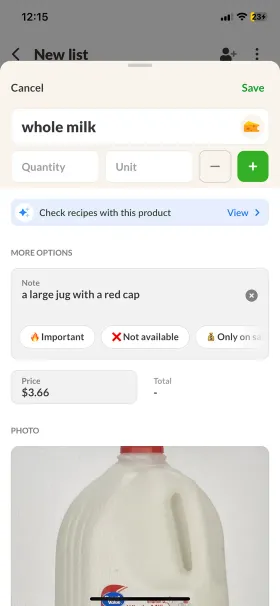
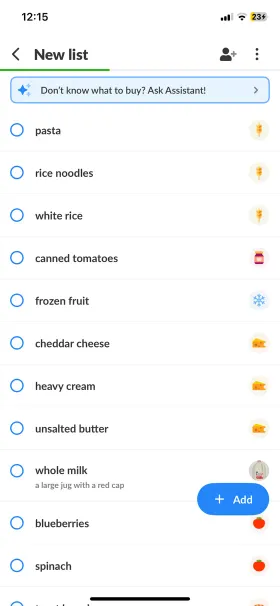
Listonic is designed to make grocery shopping as efficient as possible: unlimited lists, automatic and custom sorting, real-time sharing. Prices, notes or photos can be attached to each item, and it is exactly those small things that decide whether you know, standing at the shelf, which version of a product to buy.
Samsung Food, packed as it is with meal planning, takes a far more sparing approach to the list itself. Its main strength is turning recipe ingredients into a shareable list, which works well for someone planning meals ahead. Managing an ordinary weekly list is minimal: items cannot be edited or manually reordered, which makes the process feel rigid.
Worth saying outright: Samsung Food is not weak here by accident. It is an app about cooking, where the shopping list is the last step of a recipe rather than the starting point. If that is what your week looks like, the rigidity will not get in your way at all.
Four things you do every week
The four actions that come up most often on a weekly shop, and how each app handles them [1, 2].
| Task | Listonic | Samsung Food | Winner |
|---|---|---|---|
| Add an item and correct it a moment later | Quantity, unit and note editable at any time | List items cannot be edited | Listonic |
| Order the list for the store layout | Automatic sorting, custom categories and their order | Automatic sorting yes; manual sorting and custom categories no | Listonic |
| Check what the trip will cost | Prices against items and a running list total | No prices and no total; online shopping instead | Listonic |
| Turn a recipe into a shopping list | The AI assistant will build a week’s list, but will not save the recipe | A recipe from any website becomes a list in one action | Samsung Food |
That last row is what people install Samsung Food for in the first place. If your shopping starts from a recipe, Listonic’s first three advantages apply to a stage you only reach later anyway.
What sits behind the paywall
Both apps are freemium. The difference is where each one draws the subscription line [1, 2].
Listonic leaves the whole shopping feature set on the free side. The premium version removes ads and unlocks personalization: font, theme and currency settings regardless of location.
Samsung Food draws that line higher. Beyond ad removal, the subscription covers pantry management, nutrition tracking and AI-generated recipes, and free users can save only a few meal plans.
| Pricing angle | Listonic | Samsung Food | My take |
|---|---|---|---|
| What you get without paying | Unlimited lists, sorting, custom categories, prices and totals, item photos, shopping history and voice input | Recipes, basic meal planning and list generation from ingredients, but only a few saved plans | Listonic’s whole shopping feature set is on the free side |
| What the paid tier unlocks | Ad removal, font, theme and currency settings | Ad removal, pantry management, nutrition tracking, full-week plans and AI-generated recipes | In Samsung Food the subscription covers features, not just appearance |
| Ads on the free tier | Yes, until you buy premium | Yes, until you subscribe to Samsung Food+ | Here the two apps are level |
Personalization: shopping habits against a diet profile
Both apps learn about you; they just learn different things. This is probably the cleanest picture of the difference between them [1, 2].
Listonic learns your shopping habits Listonic
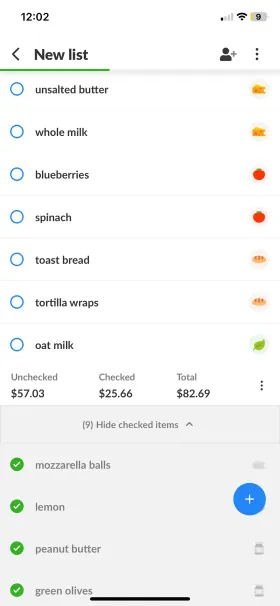
The app asks less about a profile and adapts more to how you shop. It remembers frequently bought items, keeps a handy list of recently bought products, and lets you create custom categories and order them the way you actually walk your store. Personalization here is a side effect of use, not of a questionnaire at sign-up.
Samsung Food asks for a diet profile up front Samsung Food
At registration you set dietary goals, ingredients to avoid, preferred diets and how many meals you plan each week. Those preferences then shape the recipes, meal plans and community suggestions the app shows you. It is personalization wider than shopping, about lifestyle and nutrition rather than about how you walk a store.
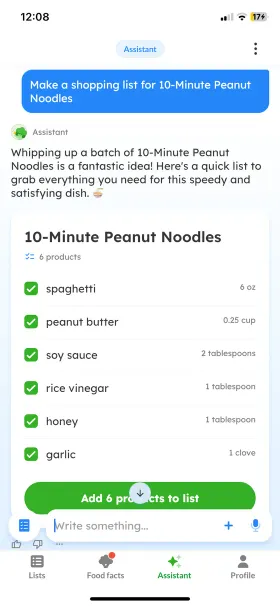
Free features, side by side
The first eighteen rows are the free-features table from the source version of this comparison, plus the Android widget from its availability table. I added the last five on the recipe side, because without them the table would leave out most of what people install Samsung Food for [1, 2].
| Feature | Listonic | Samsung Food |
|---|---|---|
| iOS/Android app | Yes | Yes |
| Web app | Yes | Yes |
| Android widget | Yes | No |
| Unlimited lists | Yes | Yes |
| Real-time sync | Yes | Yes |
| Product suggestions | Yes | Yes |
| Quantities, units and notes on items | Yes | Yes |
| Automated sorting | Yes | Yes |
| Custom sorting | Yes | No items cannot be reordered or edited |
| Customize the category order | Yes | No |
| Add your own categories | Yes | No |
| Shopping history | Yes | No |
| Voice input | Yes | No |
| Add item prices | Yes | No |
| Total cost calculation | Yes | No |
| Item photos | Yes | No |
| Online shopping | No | Yes |
| Premium plan | Yes | Yes |
| Save recipes from any website | No | Yes |
| Full-week meal planning | Partial through the AI assistant, as a finished shopping list | Yes 7-day plan on Samsung Food+ |
| Nutritional information | Yes Food Facts nutrient info, US only | Yes Full nutrition tracking and diet-matched plans |
| Identify ingredients from a photo | Yes adding items from a photo via the assistant | Yes Vision AI |
| Samsung appliance integration | No | Yes |
FAQ
Is Samsung Food any good for an ordinary shopping list?
For one generated from a recipe, yes. For one kept by hand, poorly: items cannot be edited or reordered, and there are no custom categories, no shopping history, no prices and no list total. That is five separate rows in the feature table, and Samsung Food has "no" in all of them.
Will Listonic turn a recipe into a shopping list?
The AI assistant will build a week’s shopping list from what you want to cook, but Listonic keeps no recipe library and does not save recipes from the web. If that is how you plan, Samsung Food does that one thing better.
Which app gives you more for free?
Listonic. The whole shopping feature set, sorting, custom categories, prices, totals, photos, history, voice, is in the free version, and premium removes ads and adds appearance settings. In Samsung Food, pantry management, nutrition tracking, full-week plans and AI recipes are behind the subscription.
Do you need Samsung hardware to use Samsung Food?
No. The app runs on Android, iOS and the web regardless of who made your phone. Integration with Samsung smart appliances, preheating an oven from the app, say, is an extra for people who own that hardware.
The bottom line
Final verdict
For keeping a shopping list, I think Listonic is the better tool: items can be edited and sorted, there are custom categories, prices and totals. Samsung Food wins where the shopping starts from a recipe, and at that one thing it is genuinely good.
I think Listonic is the better fit for anyone who wants a fast, reliable grocery list app: its core features are free, it sorts intelligently, shares in real time and lets you organize the list your own way without locking essential tools behind a paywall. Samsung Food concentrates on recipes and limits what you can do with the list itself, but if your week begins with a meal plan rather than a shopping note, that is exactly where the advantage changes sides [1, 2].
